
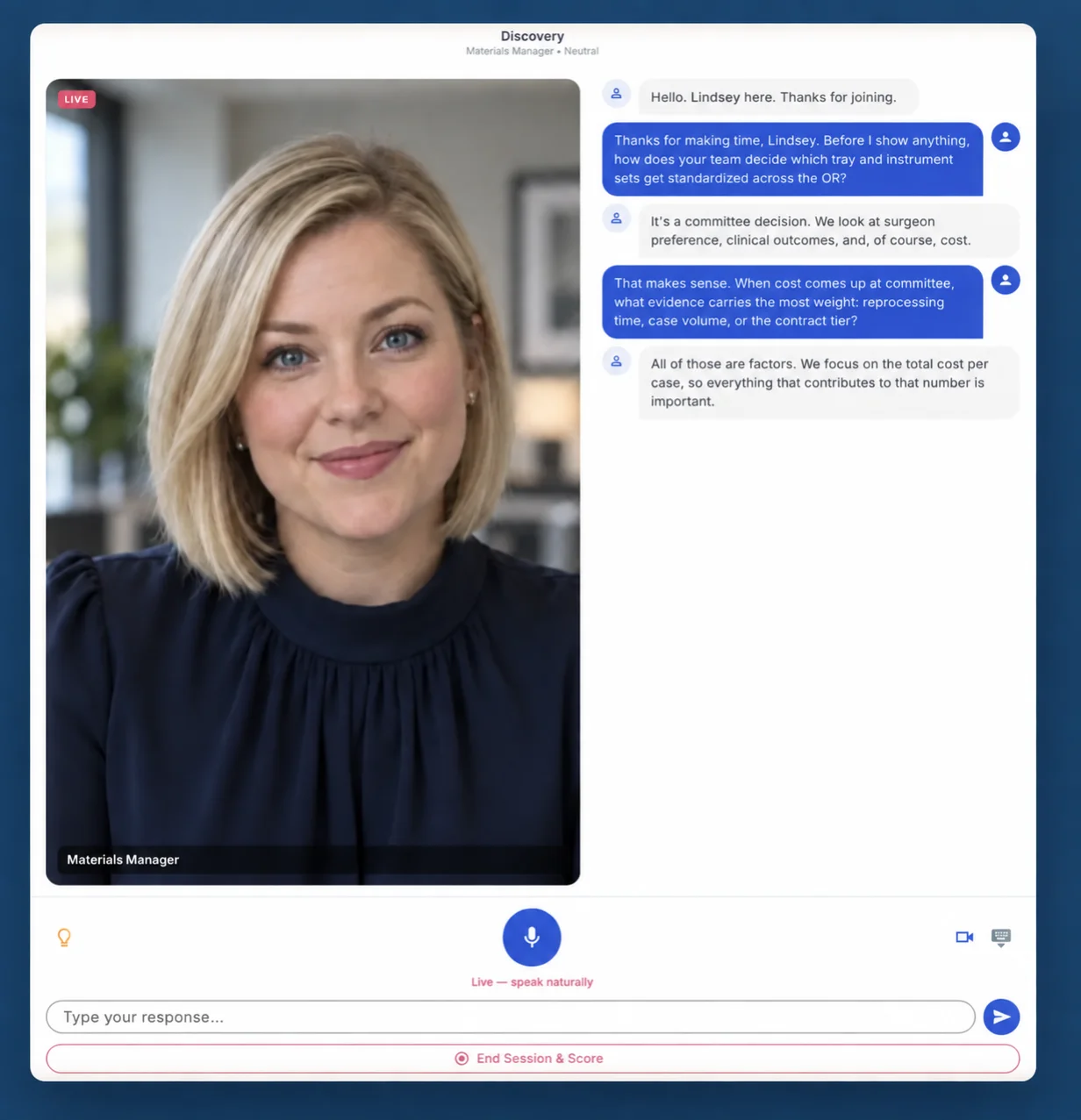
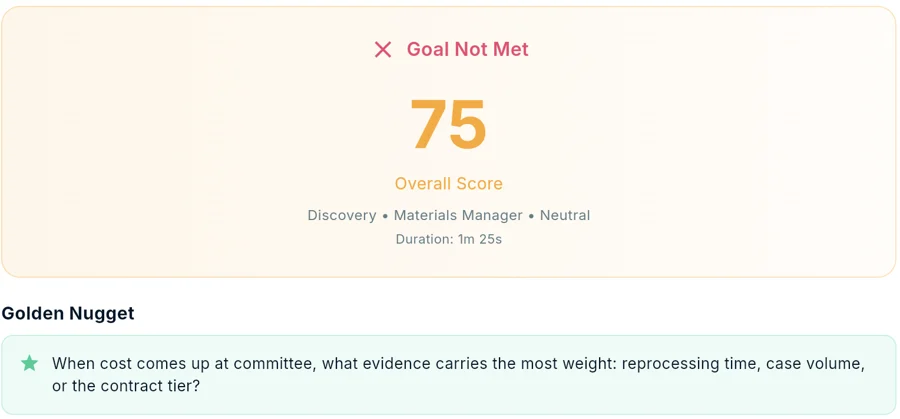
SoloFire's AI role-play now has a live avatar. Reps can practice a sales conversation face-to-face with a lifelike AI buyer on video — one that listens, responds, and reacts in real time — and then get a scorecard that checks every product claim they made against your approved content. Live avatar role-play is available now as a $15 per user per month add-on that includes one hour of live avatar coaching per user each month; ask us to turn it on for your team.
Voice and text practice aren't going anywhere. Live avatar is a third way to rehearse, built for the conversations where how you come across matters as much as what you say.
What's new: a buyer you can look in the eye
Until now, AI sales role-play in SoloFire meant talking with an AI buyer by voice or typing the conversation. Both are good for getting the words right. Neither prepares a rep for the moment the words have to come out while someone is watching them say it.
Live avatar mode puts the buyer on screen. The avatar listens and responds on video in real time, and the rep sees their own camera alongside it — the same layout as the video calls reps already run with customers. Reps practice holding composure through a hostile question, not just finding the answer to it.
Why practice sales conversations face-to-face?
Medical device and life science reps don't sell over chat. They sell across a desk from a value analysis committee, in a hallway outside the OR, and on video with a hospital CFO who has a hard stop in ten minutes. The hard part of those conversations isn't knowing the clinical data — it's delivering it cleanly when the buyer frowns, interrupts, or goes quiet.
Role-play with a manager catches some of that, but it doesn't scale, and most reps would rather not rehearse their weakest answer in front of their boss. A live avatar gives every rep a private rehearsal that looks and feels like the real meeting, as many times as they want, before the meeting that counts.
How does live avatar role-play work?
Setup is the same as any SoloFire role-play, with one extra choice:
- Pick the delivery. Flip the toggle from Voice to Live avatar. (Reps can also switch to text at any point in a session.)
- Sell or Buy. Sell to the AI buyer, or use Buy (reverse) mode, where the rep plays the customer and hears the AI pitch.
- Choose the scenario. Cold Call, Discovery, Pricing & Negotiation, Objection Handling, or Customer Save.
- Set the buyer. Mood (friendly, neutral, or hostile), difficulty (Shadow, Standard, or Interruption), persona, and optionally the industry and product line.
Shadow difficulty shows hints automatically, which makes it a good first run for a new hire. Lightbulb hints are available in every mode for when a rep gets stuck.
What admins control
Free-form practice is the rep's call. Assigned practice is yours. When an admin builds a scenario and assigns it to users or teams with a due date, they also decide how it's delivered:
- Voice or Live avatar, per scenario. Make the launch-objection drill a face-to-face exercise and keep the quick product-knowledge check on voice.
- A pinned avatar face. Choose from 12 avatar faces and pin a specific one to a scenario, so every rep meets the same buyer.
- What the buyer knows. The AI buyer is briefed only from the content the admin selects.
- Follow-through. Reps get automatic email reminders, and results roll up per scenario.
That makes live avatar practice something enablement can plan around, not just a feature reps may or may not find. Pair an assigned scenario with a course in rep training built for the field and reps learn the message, then say it out loud to a buyer who reacts.
What happens after the session?
Every session ends with the same scorecard, whatever the mode: an overall score out of 100, strengths, areas to improve, and the talking points the rep missed.
Then comes the part regulated teams care about most. What the rep said is checked against your content library, and any inaccurate or unverified claim is flagged — on the rep's scorecard and in an admin report with drill-down. If a rep overstates an outcome while practicing for a value analysis committee, you find out in rehearsal, not in the meeting. For medical device field teams, that's the difference between a coaching note and a compliance conversation.
How do I turn on live avatar role-play?
Live avatar role-play is available now in the SoloFire web app as a $15 per user per month add-on that includes one hour of live avatar coaching per user each month. Voice and text role-play are included in every plan with no minute limits. It's off by default: we enable it for your company on request, and your admin then turns it on for the configurations that should have it.
If you're new to SoloFire, live avatar role-play sits inside the broader AI sales coaching toolkit, alongside Live Call Co-Pilot for real-time tips on actual calls. For which conversations to practice first, start with our library of medical sales role-play scenarios.
Frequently asked questions
Does live avatar replace voice role-play?
No. Live avatar is a second mode alongside voice, and reps can switch to text at any time. The scenarios, hints, scorecard, and claim verification work the same way in every mode.
Who decides whether a rep practices with the avatar or by voice?
For assigned scenarios, the admin decides — Voice or Live avatar — and can pin a specific avatar face. For free-form practice, the rep chooses.
What does the AI buyer know about our products?
For admin-assigned scenarios, the AI buyer is briefed only from the content the admin selects. Buyer personas can also be linked to specific content, so a CFO persona draws on your economic material.
How do we get live avatar role-play?
It's available now in the SoloFire web app. Live avatar is off by default: ask us to turn it on for your company, and your admin then enables it for the configurations that should have it.