
SoloFire for Chrome is a free Chrome extension that opens your SoloFire library in a side panel beside whatever you’re working on. Pick a few files, share them as a tracked Space in a couple of clicks, and paste the link anywhere. Or ask Spark about the page you’re reading, with answers from your company’s approved content.
Free to installSign in with SSOSees only what you’re permitted to

Reps spend the day in a browser: a prospect’s website, an inbox, a CRM, a LinkedIn thread. SoloFire for Chrome brings the approved library and Spark into that same window, so sharing the right file never means switching apps.
Select one or many files, add a name and an optional message, and the Space link is copied for you.
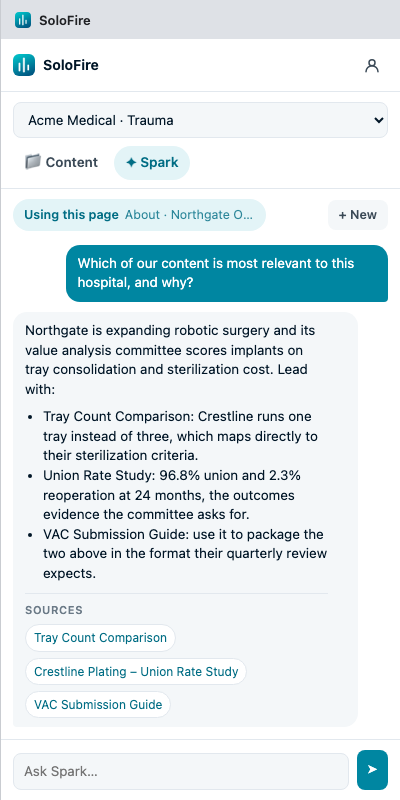
Spark answers from your company’s approved content and cites the source files it used.
“Ask Spark about this page” and “Share SoloFire content” sit in the page’s right-click menu.
Walk your configuration’s folders or search files by name without leaving the tab.
Sign in with your SoloFire account, including single sign-on. The extension never sees your password.
Reps see the same content they already have access to in SoloFire. Nothing changes about who can see what.
Researching a hospital before a value analysis meeting? Open the panel, tick the case study, the comparison and the submission guide, and hit Share. SoloFire turns them into one tracked Space and copies the link.
Switch on “Use this page” and Spark reads the page you’re viewing alongside your library. Ask “which of our case studies fits this hospital?” and get an answer grounded in approved content, with the source files listed underneath.
No new login to remember and no admin project. If you use SoloFire today, you already have everything you need.
Install SoloFire for Chrome free from the Chrome Web Store and pin it to your toolbar.
Use your existing SoloFire account, including single sign-on. The extension gets a revocable token, never your password.
Click the icon or right-click the page. Share content as a Space, or ask Spark about what you’re reading.
SoloFire for Chrome works on any website. The Space link is copied to your clipboard, so it goes wherever you can paste text, and every open still shows up in your Space analytics.
No special integration required: SoloFire for Chrome doesn’t plug into other sites, it hands you a link you can use in any of them.
The extension adds a new place to work, not a new set of rules. Access, content and tracking all stay exactly where they were.
Sign in with your SoloFire account, SSO included. The extension never sees your password; it holds a revocable token you can disconnect from the panel or from Settings › Connected apps.
Reps only see content they already have access to in SoloFire. Spark answers only from your company’s approved content, and reads the page only when you switch on “Use this page”.
The extension doesn’t track anything itself. Engagement comes from the Space you share: who opened it and what they viewed, in the same Space analytics you already use.
It’s free to install. Use the SoloFire login you already have, and your library shows up in the side panel.
Add to ChromeBring a case study, a deck and a prospect’s website to a demo. We’ll share a Space from the panel and ask Spark about the page, live.
Book a demoCommon questions from reps, admins and IT teams.